Just added a document, then found one that is in a better format with footnotes, but can't delete the first document BC there is no delete option on the Actions button menu. Please advise!
Date
Votes
7 comments
-

Bjørn P. Brox Which actions menu?
And why should you find the document in the actions menu on a profile? It is more logic that you find it in the documents list either on the profile or in your own Added Documents list where you can remove it. -

Lani Kathleen Friend I went to the "documents" section under "Research" to delete one of the docs.
I also looked for a delete button/option in "Recent Activities".
Where are we supposed to go to find this option?
This is very user-unfriendly.
-
Bjørn P. Brox The obvious place: on the document itself if it is a document you have added yourself. If not you as the profile manager should have the option to unlink the profile from the document.
-
Lani Kathleen Friend I followed the instructions from the knowledge base and community help page:
"Locate the document under your documents , click on it and use the 'Actions' button delete the document."
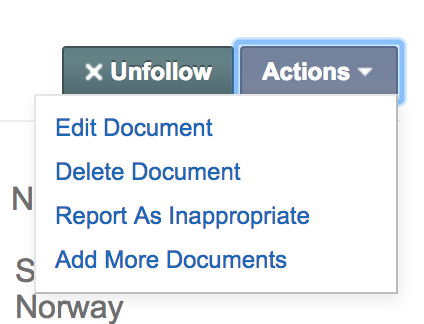
So I went to "documents" (which is under the Research menu), clicked on the document to be deleted, and when the actions button appears, I click on it, and I get 4 options:
So it is in no way "obvious" and it still doesn't work. Where is the delete doc option in this list? Someone needs to fix this problem because other people are experiencing the same thing if you read the questions on that page.
BTW, you could use a little manners training. Your response was arrogant and curt. Not exactly a good technique for increasing membership.
You should do exactly what I did and figure out why the delete option is not showing up!
-
Bjørn P. Brox And the Profiles list is empty?
If the document is bound to one or more profiles you need to clear that list first. -
Lani Kathleen Friend I went to My Profile page and down to the bottom to the "Activity" tab. Is that the list you are referring to? I clicked on the document I wanted to delete in the Activity folder, and I got the same 4 above-referenced options.
-
Lani Kathleen Friend Problem solved! (by a "newbie", no less)
Are you not on the GENi expert team? Because if you are, you should have known what was happening immediately. I shall enlighten you.
Here is what is happening: when you mouse over the document anywhere on your site (profile page, activity tab, media tab, documents option under Research label on toolbar), you are offered two option boxes: Follow and Actions. Click on Actions and you get only the 4 options I mentioned above: edit/view larger/comment/view in new window. NO delete option! So why would anyone go on to open the document after that (thinking that those are the only 4 things they can do to it)?
Somewhere it should be pointed out that you can only delete the doc by going to the next step and opening it, not by mousing over it. And then when you do open it, the Actions box is in the upper right of the page, not in a pop-up box like the mouse over options! Illogical and inconsistent.
I consider this a design flaw/failing. I do hope you pass this on to the engineers at GENi. And I hope that this message stays on the community help page archive so other people can benefit from it.
You're welcome :)
Please sign in to leave a comment.