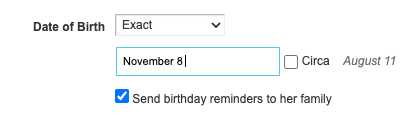
When using a notation of ( MMMM-DD ) [e.g. November 8] - the field is parsed individually (November -> 11 and 8 to 8) - what comes around as August 11 (11/8).
Picture:
When using a notation of ( MMMM-DD ) [e.g. November 8] - the field is parsed individually (November -> 11 and 8 to 8) - what comes around as August 11 (11/8).
Picture:

Did you set the date format and language correctly in https://www.geni.com/account_settings/localization ?

Define correctly. I mean - yeah - its set to DD/MM/YYYY and language is English (US) so if I'll write 4/6/2022 it'll say "June 4 2022" and not "April 6 2022" but in this case I'm entering plain text month, not a number and this behavior is just wrong.
Thanks, hope Geni will look at it

Hi Guy, we've forwarded this to our engineers so we can better handle this situation when entering month name and day in a different format from what is set in your input date format settings.
In the mean time, since your input date format settings are set to DD MM YYYY, if you enter "8 November," you will see the correct date in the preview.
If I can argue my point -- I didn't do anything in "different format" --
Writing "08 11 2022" and writing "November 8 2022" are both valid when using "DD MM YYYY" locale.
This has been fixed.
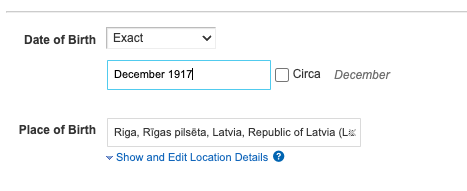
I'm not sure if related, but now, dates like "December 1917" can't be parsed.
Thanks. We'll take a look and let you know once we have an update.
We pushed a fix. Can you please try again?