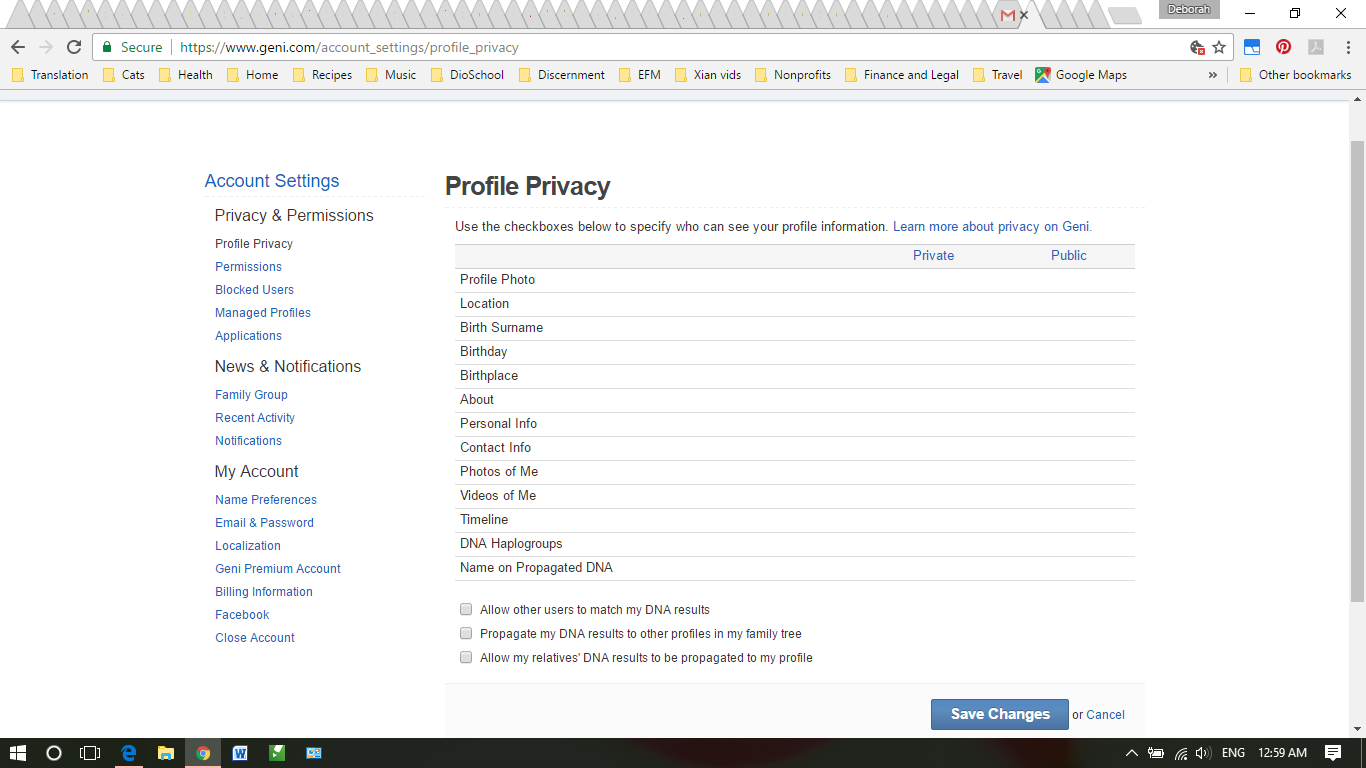
Using Chrome 56.0.2924.87 on Windows 10. Was paid subscriber, am now basic. I want to change my privacy settings. However, when the page loads, the checkboxes do not appear. Even when I hover my mouse over the area where the checkboxes should display, the cursor does not change. Is this a bug or do I need to do something special for the checkboxes to display?
Date
Votes
9 comments
-

Geni Customer Support Official comment Thank you for bringing this issue to our attention. It has been resolved.
-

Bjørn P. Brox The checkboxes for privacy is disabled if the profile is marked as living.
-

Deborah Heyn Workman Really? That seems backwards and like a design flaw to me. It used to be that records of deceased people whose information is in the public domain were automatically displayed. However, living people had the option to manage their privacy settings. Even living people in my tree have at least part of their information hidden. My own, however, is not at all private, and I don't like that. Of course, I know that web crawlers by now have probably propagated my info all over the Internet, so I have no hope of scrubbing my information. But I'd still like to get at those checkboxes!.
-
Bjørn P. Brox It is not a design flaw, - you are in general not allowed to make public profiles of people still living, and that is not only for Geni.
The only exception is of people that are highly public already, and that is covered by Master Profiles only curators have access to designate. See http://help.geni.com/hc/en-us/articles/229704047-What-is-a-Master-Profile-
You can ask Curators to review profiles you want to be Master Profiles in this discussion: https://www.geni.com/discussions/142974. Many use the rule that the person must be public on a Wikipedia page to be considered as public enough to be a Master Profile
User profiles cannot be made public anyhow, - but the user him/herself can lower the privacy shields by making the About Me etc public. -
Deborah Heyn Workman That's exactly my point. I am living. It is my own privacy settings that I cannot change. I should be able to change those, should I not? I want them to be private. Right now they are public. And I cannot change them because the checkboxes to do so are not available to me. That, it seems to me, is either a bug, or is turned off because of a toggle I activated elsewhere, but I can't figure out where.
-
Bjørn P. Brox As I said: Users can lower their own privacy shields to make them almost look like public profiles, except for editing by none family.
Take a closer look in the menu you find by clicking your own name in the upper right corner of a Geni page.* https://www.geni.com/account_settings/profile_privacy
* https://www.geni.com/account_settings/permissions -
Deborah Heyn Workman Thanks, Bjørn. I'm afraid that I looked at those links already. I can change the settings under permissions because the checkboxes are displayed there, but I can't do anything under profile privacy because this is what displays.
-

Jeff, Geni Curator This problem is also documented here: http://help.geni.com/hc/en-us/community/posts/115000964627-Privacy-settings
The screenshot helps - We'll let the dev team know.
-
Deborah Heyn Workman Thanks, Jeff, for passing this along to the dev team. And thanks, Geni Customer Support, for letting me know the problem is resolved. The checkboxes (actually radio buttons) are visible now. As for the privacy problem, it seems to have something to do with my agreeing to the recommendation to give permission to MyHeritage to make some, or some part, of my records searchable. I hope to be able to figure out how to configure that so enough info is out that to capture the kinds of searches I'd like, but not so much is out there that I feel exposed and potentially at risk.
Please sign in to leave a comment.