5 comments
-
Geni Support Team Hi Roger, can you provide a specific example along with the steps you took so we can recreate your issue? Or perhaps a screenshot of how the data is entered?
Have you tried expanding the location details first and manually entering the information instead?
-
Roger Schaefer The problem is simple. When I first started to build my tree a month ago everything work fine. I have a lot of information on the towns that my ancestors came from and I entered this information by hand and when I first started spot checks the information was there but about a week and a half ago I did a spot check and the names, birth and death dates were there but the location information was gone. I did more spot checks and found that the locations that I had used the drop down window for ( only about 10 percent) was still there all the rest was gone. I re-entered the information by hand and hit “save”. I then gave it a short time and checked. The information I had just put in was gone. I tried to fool the system by using the drop down window to put in the area I.e. Yorkshire England, and then saving I then went to profile and hit “Edit” and hand entered the town name and saved. In a short time I checked and Yorkshire England was still there but the town name was gone. Anything I hand enter disappears as soon as I hit “Save”, but when I use the drop down window it stays. I have been trying to work within the system and getting as close to the location as the drop down window will let me but many times that is only the country and since the drop down windows uses modern addresses I now have 600 year old ancestors with zip codes. I have started to replace a little of the lost data using the drop down window but it would be a very big job to replace it all. I am hoping that the data has simply been hidden and not deleted and can be retrieved. I do not know where you expand the location details but I will try and find them.
-
Job Waterreus It may help if you give some information about the device and browser you are using. Are you entering data from profile view or from tree view?
-
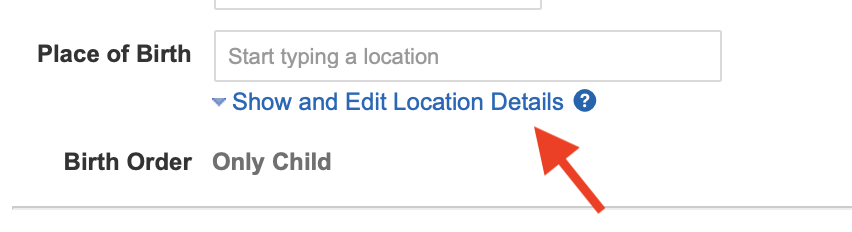
Geni Support Team Below the location field, there is a link that says "Show and Edit Location Details."

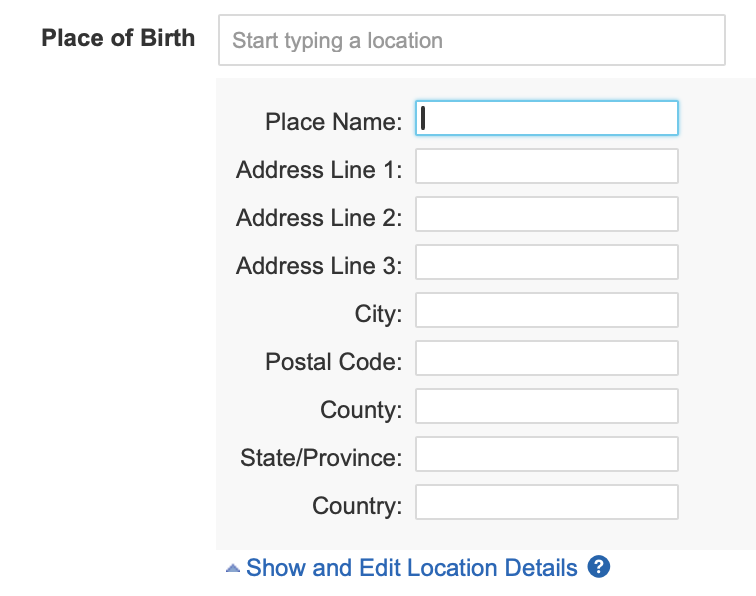
Click on this to expand the field so that you may manually enter the location information in each field.

-
Roger Schaefer Thank you I found this window yesterday right after I posted. I have experimented and found that if I enter in the window for place of birth or death it still disappears as soon as I hit save but when I use the address lines the information is still there when I spot check. In terms of what I use I have an apple tablet (no home computer). I usually take my information from the profile page (easily to read). Most times I have to hand enter all the information which does require a large amount of switching back and forth. Please remember though that I have been spot checking since my first day building the tree a month ago and for the first two weeks or so the information was there. I hope this information is of use to you in figuring out where my data went. If worse comes to worse I will re-enter it all by hand. Thank you for your help.