I am trying to add a parent to the profile of someone in my tree but it is a Croatian name so I get a popup telling me to add a language. I added Croatian as a language but the input box remains in English even when I click on Croatian as the language then Geni won't let me save the details because I have a Croatian name in an English language box.
Date
Votes
3 comments
-

Geni Support Team Hi Philip, can you please provide a specific example?
You should be able to click "Add language" to add a language tab for Croatian. Then you can enter in the name. It shouldn't prevent you from saving if you wrote the Croatian name in the English (default) tab.
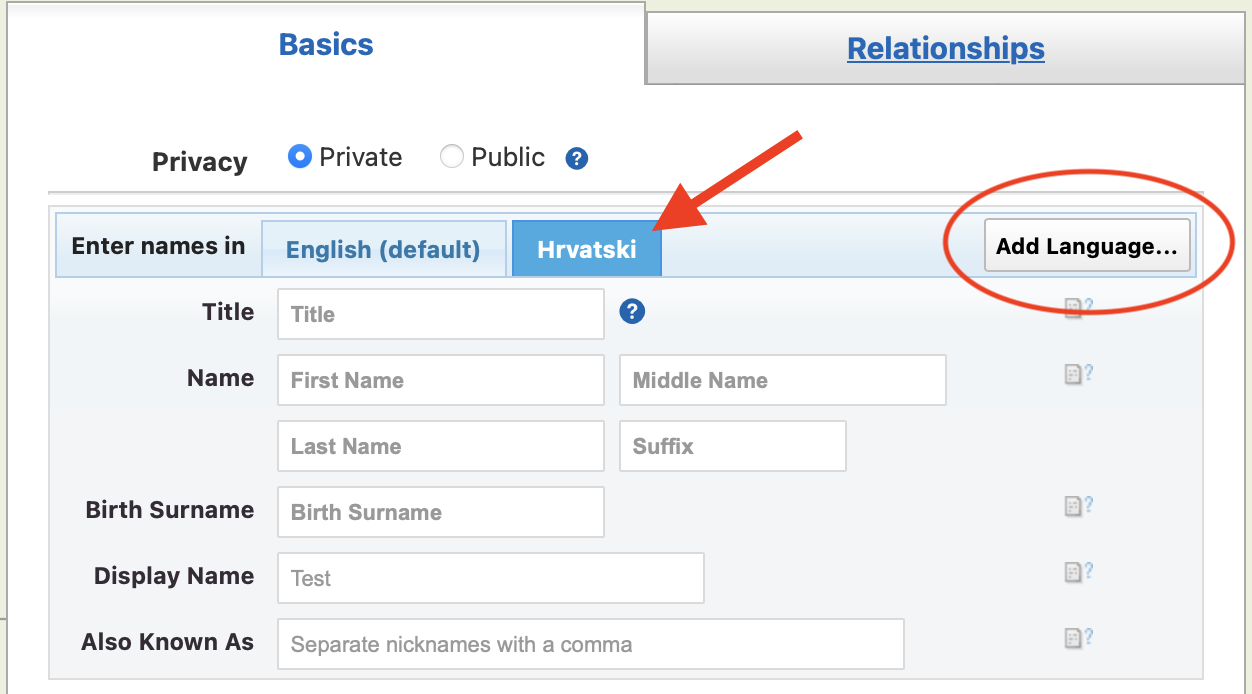
-

Philip (Phil) James Guerin Thanks. I realise that. My point is that it doesn't work. The language remains as English even after I click the tab for Hrvatski. I have now realised that I can ignore the message and save the data I have entered using English language. If I select the Croatian tab then English (default) still displays as the language in the box and it will not let me save anything I enter so I have to switch back to English to save the details I have entered.
-
Geni Support Team Hi Philip, I am not able to reproduce your issue. Can you please let us know what browser/version you have tried and what type of device?
Can you provide more details about what happens when you try to save after adding data in the Croatian tab? Do you receive an error message?
Please sign in to leave a comment.